


• OpenCritic
  • About Us
  • Write For Us
  • Privacy Policy
  • Review Policy
Become a Patron!
  • Features
  • Guides
  • News
  • Reviews
  • Nintendo
  • PC
  • PlayStation
  • Xbox
  • Opt-out preferences
No Result
View All Result
Game Sandwich
  • Features
  • Guides
  • News
  • Reviews
  • Nintendo
  • PC
  • PlayStation
  • Xbox
  • Opt-out preferences
No Result
View All Result
Game Sandwich
No Result
View All Result
Home Guides

What does Add to Wares do in Baldur’s Gate 3?

Aden Carter by Aden Carter
August 15, 2023
Reading Time: 3 mins read
A A
What does Add to Wares do in Baldur’s Gate 3?

Screenshot by Game Sandwich

What does the add to wares button do in Baldur’s Gate 3? There are plenty of actions that you can take in the game when it comes to inventory management. You can readjust your inventory and categorize it. If you are carrying too much, you can simply send your items off to another member of your party for them to hold onto.

If you have noticed, there is a button that simply says “Add to Wares” when you try to move an item in your inventory. This mysterious button has a purpose but it isn’t made immediately clear. What does Add to Wares do in Baldur’s Gate 3?

Baldur’s Gate 3: How to add items to wares

Simply put, the Add to Wares button is a means of marking items that you want to sell in Baldur’s Gate 3. When you don’t want an item anymore, right-click on it in your inventory. This will bring up a small menu. On this menu, select the Add to Wares button to mark it for sale.
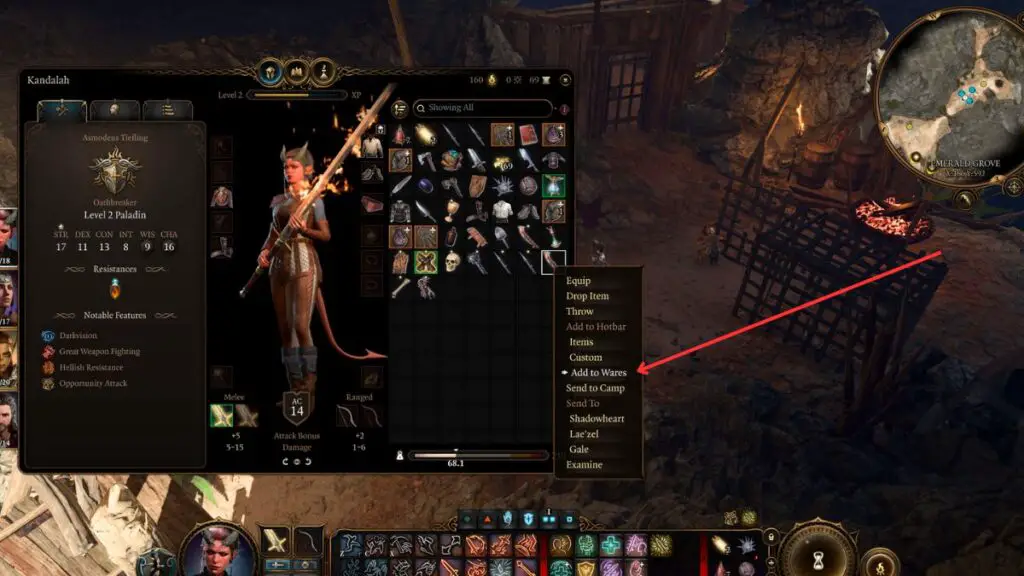
Screenshot by Game Sandwich

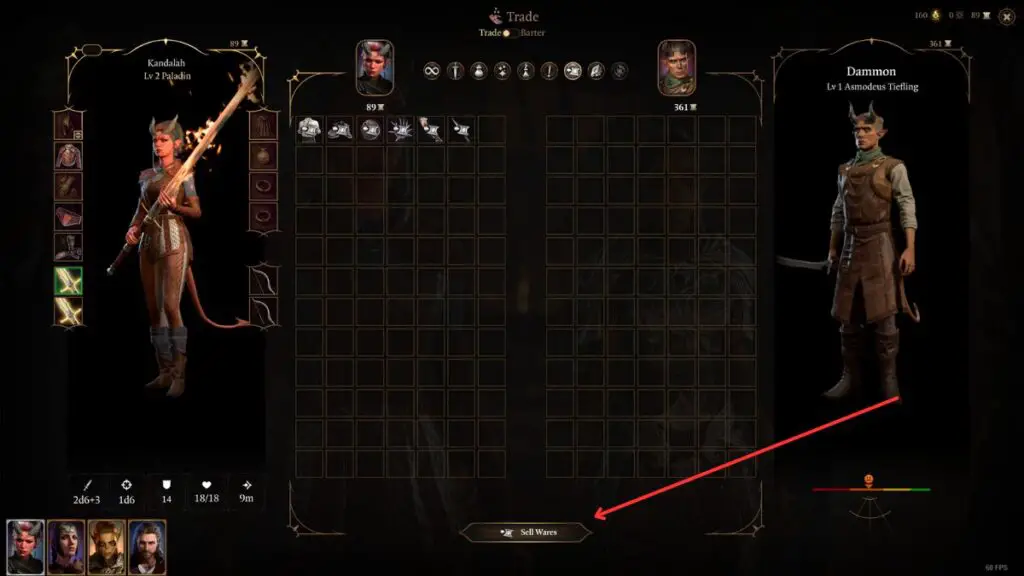
After you have selected this option, you will see a small money symbol appear on the item you marked. Now, head over to a merchant and you will see the barter/trade option in the trade menu. Set this option to trade. From there, select the sell wares option at the bottom of the trade menu.

This will allow you to sell all of your wares at one time instead of needing to select them all individually. All of the gold will be added to your inventory automatically after selecting this option.
Screenshot by Game Sandwich

There are plenty of traders that you can sell your wares to. Marking your items for sale is a good way to remember which items you wanted to get rid of without needing to write them down or keep track of them some other way.

More From Us:
Baldur’s Gate 3: How to become an Oathbreaker Paladin

Aden Carter

Aden Carter

Aden Carter is the lead writer at Game Sandwich. He has been writing for over three years professionally but has gamed since he was a child and could hold an N64 controller. When he isn't writing up news and guides, he is working on D&D campaigns and rolling some dice.

Related Posts

An Alan Wake and Phasmophobia Collab Is Coming Next Month
News

An Alan Wake and Phasmophobia Collab Is Coming Next Month

April 17, 2026
Moses & Plato – Last Train to Clawville Review (PC): Sly Like a Fox
Reviews

Moses & Plato – Last Train to Clawville Review (PC): Sly Like a Fox

ShantyTown Review Lighthouse Build
Reviews

ShantyTown (PC) Review: An Asian-Fantasy Building Simulator

Super Alloy Crush Preview (PC): Supreme Cat Girl Action
Features

Super Alloy Crush Preview (PC): Supreme Cat Girl Action

April 8, 2026
  • OpenCritic
  • About Us
  • Write For Us
  • Privacy Policy
  • Review Policy

Game Sandwich, LLC © 2023

No Result
View All Result
  • Features
  • Guides
  • News
  • Reviews
  • Nintendo
  • PC
  • PlayStation
  • Xbox
  • Opt-out preferences

Game Sandwich, LLC © 2023