


Following the release of the Nintendo Switch 2, I had a hankering to go back to The Legend of Zelda: Breath of the Wild. It’s been something I’ve been planning on for years, because, outside of it probably being my favorite video game of all time, I wanted to do another run on Master Mode, something I never really tried in the past. With the jump to the next-gen hybrid console, I am playing on the Nintendo Switch 2 edition of the game. While I initially went into this just to enjoy the improved performance, I finally remembered after about 25 hours that an additional feature had been added to the mix with Zelda Notes.
For those unaware, Zelda Notes is a second-screen companion feature added to the Nintendo Switch App on your phone that is compatible with the Switch 2 version of either Breath of the Wild or Tears of the Kingdom. After playing with it for a bit, I came away pleasantly surprised with it, though there is room for improvement.
Your Companion for the Journey
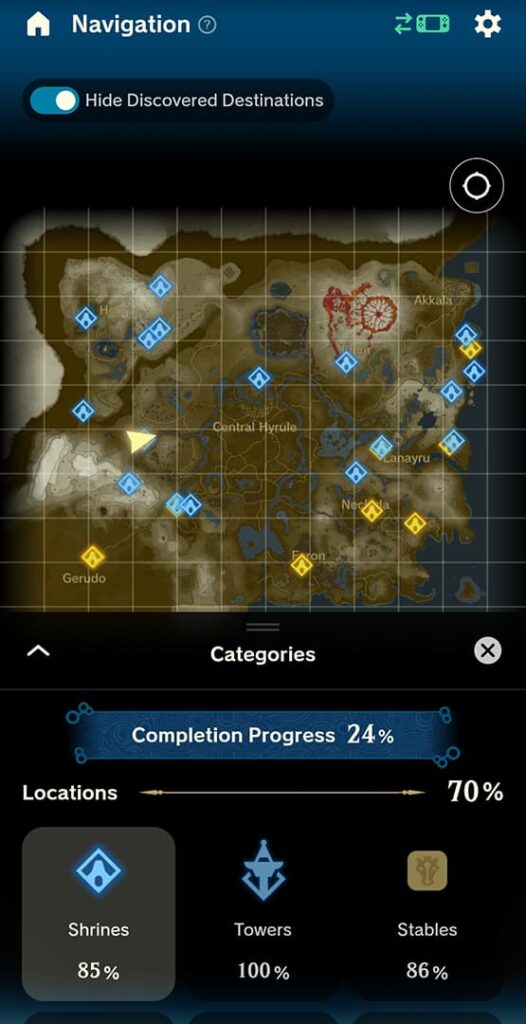
A little over a decade ago, the trend in video games was trying to incorporate companion apps into a lot of big video games. If you had a big game coming out, you could expect that there was probably an app for your phone that was going to release alongside it to “revolutionize” the experience. The problem was that these apps never worked that great. While it’s incredibly weird to have one of those companion apps releasing in 2025, I can happily say that the functions this time work pretty well. I had a bit of a headache at first because the instructions that tell you to go to the options menu in-game to activate the connection between phone and game are hidden, but after I found that, things moved swimmingly.
Related:
Lost in Time Zelda Fan Film Explores the Hero of Time’s Demise
Easily the headlining feature here is the Navigation section. Here, you get a look at the overall map, which will pretty steadily keep track of your position as you play. Using this feature, you can directly find anything on the map attuned to 100% completion. Shrines, quests, boss enemies, and yes, even Koroks, can all be located here and point you in the right direction.
One of the more interesting additions with Zelda Notes is a new collectible added to the game with Voice Memories. While you have the app open and playing, as you go to certain areas, the app will alert you to a new voice memory that gives you some context about how Zelda viewed that place 100 years prior. It’s completely voiced by Patricia Summersett, and I found it to be a really cool inclusion.
Outside of the two additions above, there are also areas that keep track of your stats for nerds who like to see what has killed you the most and how many total rupees you’ve collected, alongside a tracker for how many Zelda amiibo you’ve scanned and a daily bonus roulette that can give you extra stamina, refill your health, and more. A photo studio for in-game captures and an item sharing function are also added, but those don’t apply to me.
Taking the Slog Out of the Second Run

When Breath of the Wild came out in 2017, I went through the effort of finding every shrine and doing every quest. Korok hunting was a bridge too far for me, though. While I still don’t plan on finding every korok, I really appreciate the option to find every single one if I wanted to with Zelda Notes navigation. Additionally, while I put in the time to wander aimlessly in my initial playthrough for shrines, being able to see where all of my missing ones are now is a nice way to take out the slog of searching. For a first-time player, I definitely recommend playing without navigation to start with, and using it only when you’re completely lost, but it’s so nice to have a guide for areas that I’ve forgotten about in the last eight years.
Related:
Lego Pokémon and Legend of Zelda Sets Rumored to Release Next Year
While the map itself is an incredibly useful tool, the navigation itself is quite annoying. If you mark an item in navigation, it doesn’t mark anything in-game. Instead, you have to either constantly look at your phone to see where to go or activate voice guidance, which is awful for long treks. A robotic voice will constantly tell you to proceed in a certain direction in an incredibly annoying way. Nice for when you’re close and need to know if you should go up or down, but I highly recommend muting it until you are very close to your destination. This would all be solved with an in-game marker, whether that would be a pin or stamp, I don’t care, but looking away from the game constantly to know if you’re going in the right direction is a pain. Luckily, the map in the app is the same as in-game, so you can set your own pin, but it’d be nice if it were automatic.
Final Thoughts

Overall, I think the Zelda Notes companion screen for Breath of the Wild is a very nice tool to have, though it’s not perfect by any means. I always saw companion apps as a waste of time in the past, but I think in this situation, it can be very helpful for someone who is lost. I will always remember the experience of running around this iteration of Hyrule blind my first time, but now that I’m older, I do love saving time where I can.
Knowing I can be directed to where I need to go at any time is incredibly useful, and I do love the addition of the voice memories as an additional collectible, even if it’s only in the app. I wish the amiibo list would tell you the possible items you can get from scanning them, but I do enjoy seeing all of my stats available to me, and the daily bonus is something I will never turn down. Even with a few shortcomings, I found Zelda Notes to be the first companion app that was actually worth the time.


