

• OpenCritic
  • About Us
  • Write For Us
  • Privacy Policy
  • Review Policy
Become a Patron!
  • Features
  • Guides
  • News
  • Reviews
  • Nintendo
  • PC
  • PlayStation
  • Xbox
  • Opt-out preferences
No Result
View All Result
Game Sandwich
  • Features
  • Guides
  • News
  • Reviews
  • Nintendo
  • PC
  • PlayStation
  • Xbox
  • Opt-out preferences
No Result
View All Result
Game Sandwich
No Result
View All Result
Home Guides

AC Mirage – How to get off camel

Aden Carter by Aden Carter
October 6, 2023
Reading Time: 3 mins read
A A
AC Mirage – How to get off camel

Screenshot by Game Sandwich

Do you want to get off your camel in Assassin’s Creed Mirage? You will be able to use a mount in various portions of the game to explore the inner and outer city of Baghdad. After a long time of training and a grueling journey across the desert, Basim arrives in the city of Baghdad on camelback along with Roshan.

Any mount that you have in the game, whether it is a camel or the devilish monster from the Fire Demon pack, you will eventually need to dismount from your camel and travel on food. After all, mounts aren’t very good at climbing city walls. This guide will show you how to get off your camel in Assassin’s Creed Mirage

How to dismount camel in Assassin’s Creed Mirage

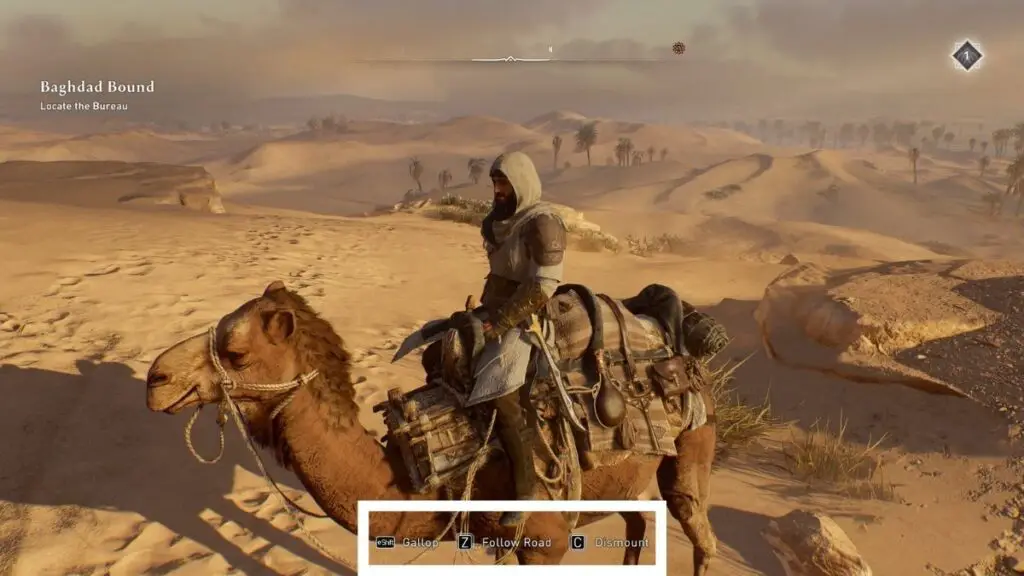
To get off your camel in Assassin’s Creed Mirage, you simply need to hold the circle button on PlayStation, the B button on Xbox Series X/S, or the C key on PC. Doing this will allow you to dismount from your mount and continue your journey on foot. You will want to dismount your camel while exploring the city because it has a tendency to bump into things as it walks.
Screenshot by Game Sandwich

There are various mount controls that you will get access to. Most of these controls will appear at the bottom of the screen while you are riding your mount. If they don’t you may have to adjust your settings.

Here are all of the other mount controls in AC Mirage:

  • Mount – Press A, X, or the E key near your mount
  • Call Mount – Hold right on the D-Pad or the X key
  • Follow Road – Hold X, Square, or the Z key
  • Gallop – Press in the left stick or press the Shift key


The controls are the same for any mount that you may use throughout the game. Remember these controls because they disappear from the screen shortly after you get on your mount.


More From Us:
Assassin’s Creed Mirage – How to Pickpocket successfully

Aden Carter

Aden Carter

Aden Carter is the lead writer at Game Sandwich. He has been writing for over three years professionally but has gamed since he was a child and could hold an N64 controller. When he isn't writing up news and guides, he is working on D&D campaigns and rolling some dice.

Related Posts

Dark Outlaw Games is Closing Down One Year After Opening
News

Dark Outlaw Games is Closing Down One Year After Opening

March 24, 2026
Crimson Desert Player Fighting Abominable
News

Crimson Desert Developer Responds to Control Complaints by Telling Players to Give it Time

March 20, 2026
TCG Card Shop Simulator Gets Tournaments, Camera Mode in New Update
News

TCG Card Shop Simulator Gets Tournaments, Camera Mode in New Update

March 19, 2026
Top 10 Metroidvania Video Games
Features

Top 10 Metroidvania Video Games

March 19, 2026
  • OpenCritic
  • About Us
  • Write For Us
  • Privacy Policy
  • Review Policy

Game Sandwich, LLC © 2023

No Result
View All Result
  • Features
  • Guides
  • News
  • Reviews
  • Nintendo
  • PC
  • PlayStation
  • Xbox
  • Opt-out preferences

Game Sandwich, LLC © 2023