

Having a base of operations in Palworld will be crucial for you to survive. A place to go home and rest while also crafting and building new items is needed for you to get anywhere long-term. However, there is always the chance that you might have put your base in a bad spot or you just want to go somewhere else. Unless you get your base to a high enough level, you can only have one spot at a time. Here is how to move your base in Palworld.
How to disassemble a base in Palworld
To move a base in Palworld, you will need to disassemble it. Unfortunately, at least at the launch of early access, there is no way to move everything in your base to another area in one fell swoop. First, your most important base piece is the Palbox. Open the map, find the Palbox, and select to disassemble it. This will let you build a new Palbox wherever you want the new base to be.
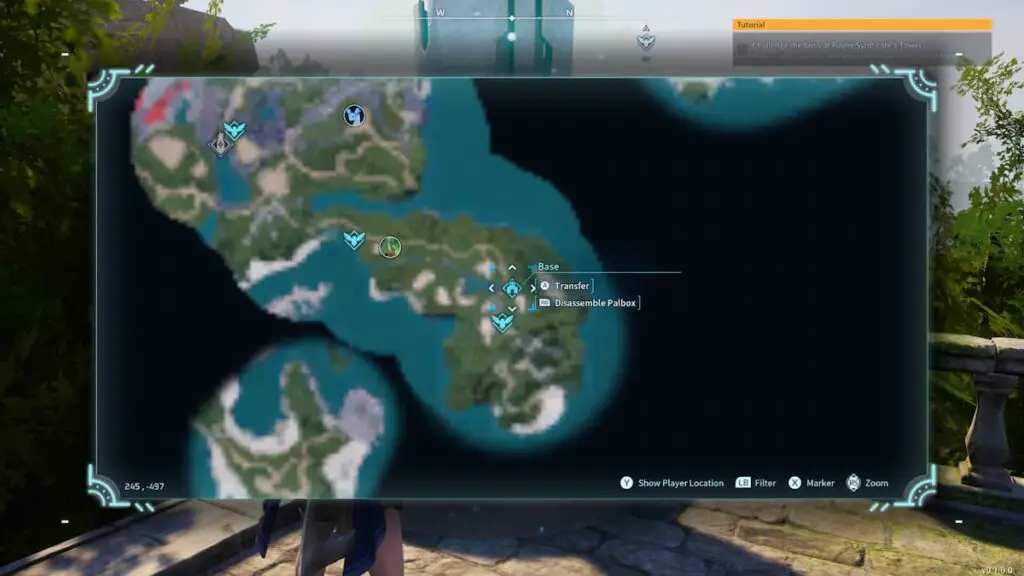
Once you have disassembled a Palbox, all of your Pals that were working at that base will be instantly moved to the Palbox storage. After the new one is built, you can put them back to work in the new area. Also, your base level does not drop down when disassembling, so whatever build missions you had previously will stay current at your new location.
Unfortunately, all of the items and various base pieces you built at the previous base will not automatically carry over with your Palbox. Some things will instantly break down, but if you have a storage chest filled with items, you will need to manually grab everything and move it to a new storage chest. Since weight limits can stop you from moving completely, this is quite the burden.
If you plan on completely abandoning your previous location but want some resources back, you can open the build menu, and at the bottom of the screen, you can enter disassembly mode. On Xbox, press the right stick or C on PC. You can then go to each item, break them down, and instantly get those resources back.

With the game only being in early access as of this writing, hopefully, a more streamlined way to move bases will be introduced to Palworld in the future.