


As you work to level up your base in Palworld, you will be tasked with researching and creating all kinds of structures. These will help you greatly to progress in the game as you get more powerful and can make better items. One of these items, the Egg Incubator, is an easy thing to build in the early going, but if you haven’t found the right eggs, you might not know how it works. Here is how to use the Egg Incubator in Palworld.
How to make the Egg Incubator in Palworld
The Egg Incubator is easy to use in Palworld, but oddly enough, it seems to have different unlocking criteria between the Steam and Xbox versions. On Steam, it is under the Ancient Technology section, so you will need to kill a boss before you can unlock it. On Xbox, it is under the normal Technology tree with the majority of other items.
After it is unlocked, you need:
- 10 Paldium Fragments
- 5 Cloth
- 30 Stone
- 2 Ancient Civilization Parts
How to hatch eggs in an Egg Incubator in Palworld
When you place your Egg Incubator and finish building it, you need an egg to put in. You will eventually come across these when you are walking around the world. Do some exploring, and be sure to climb various hills and mountains to find them in odd places. If you find just normal white eggs, those are only meant for food and will not hatch into any Pal. The ones you can put in the incubator are colorful and always sit in a nest.

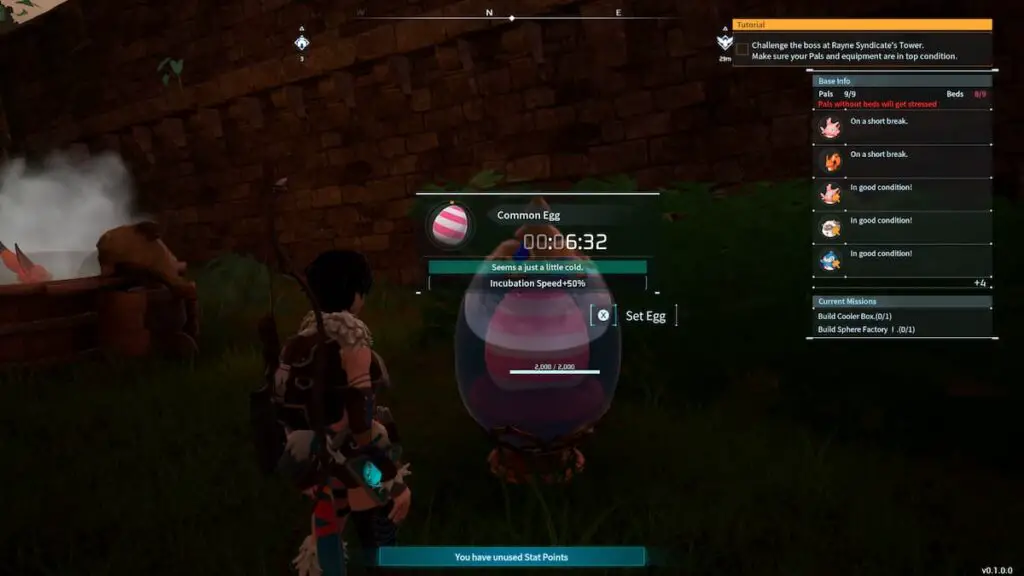
With an egg in your inventory, go to the Egg Incubator and put it in. Now, when you look at the incubator, it will tell you how long you have to wait before the egg hatches. Unless you are playing on a dedicated server, the timer for this will stop if you exit the game.
Different kinds of eggs also have different temperatures that will make them hatch faster or slower. For example, placing a Damp Egg in a cool area will speed up the process. The incubator will tell you if an egg is too hot or cold and how much longer it is taking to hatch. Place a Cooler or Heater nearby to get the right temperature to speed things up. Once the timer is up, interact with the incubator, and your new Pal will be added to the Palbox.